 ExtLab
 Copy URLs guide
ExtLab Copy URLs copies your tabs as a list, and opens a pasted list again. This guide covers every setting. Sections marked Pro need a license or the 7-day trial. For a way to do this without an extension, see how to copy all open tab URLs in Chrome.
Install
ExtLab Copy URLs is coming soon to the Chrome Web Store. It will need no account.
Pin the icon: click the puzzle piece in the Chrome toolbar, then the pin next to ExtLab Copy URLs.
Your first copy
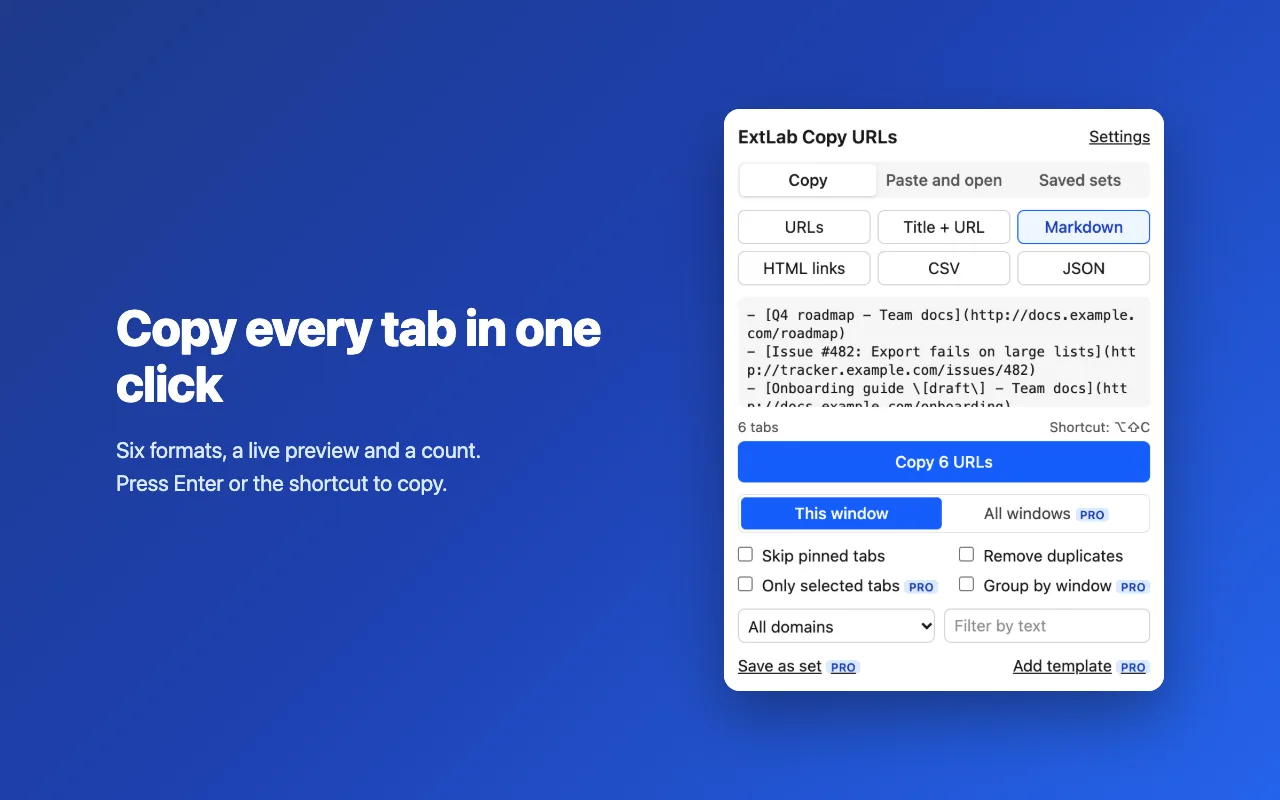
- Click the ExtLab Copy URLs icon. The popup shows the tabs of this window.
- Under Format, pick one. The preview shows the result.
- Press
Enteror click Copy. The button has focus when the popup opens.
Formats
| Format | Use it for |
|---|---|
| URLs | A plain list, one per line |
| Title + URL | A list people can read |
| Markdown | Notes, tickets and README files |
| HTML links | Web pages and rich text editors |
| CSV | Spreadsheets |
| JSON | Scripts and other tools |
Titles are escaped for each format. In CSV, a cell that starts with =, +, - or @ gets an apostrophe in front, so a spreadsheet cannot run it as a formula.
Skip and clean up
- Skip pinned tabs leaves out pinned tabs.
- Remove duplicates keeps one copy of the exact same URL. A different query or hash counts as a different page.
Keyboard shortcut
Alt+Shift+C copies with your last format and options. On a Mac, Alt is Option. The popup opens, copies, shows the count and closes after about a second.
Chrome lets a visible popup use the clipboard without an extra permission, which is why it appears. The shortcut does not use the filters, which last only until the popup closes. Change the keys at chrome://extensions/shortcuts.
Paste and open
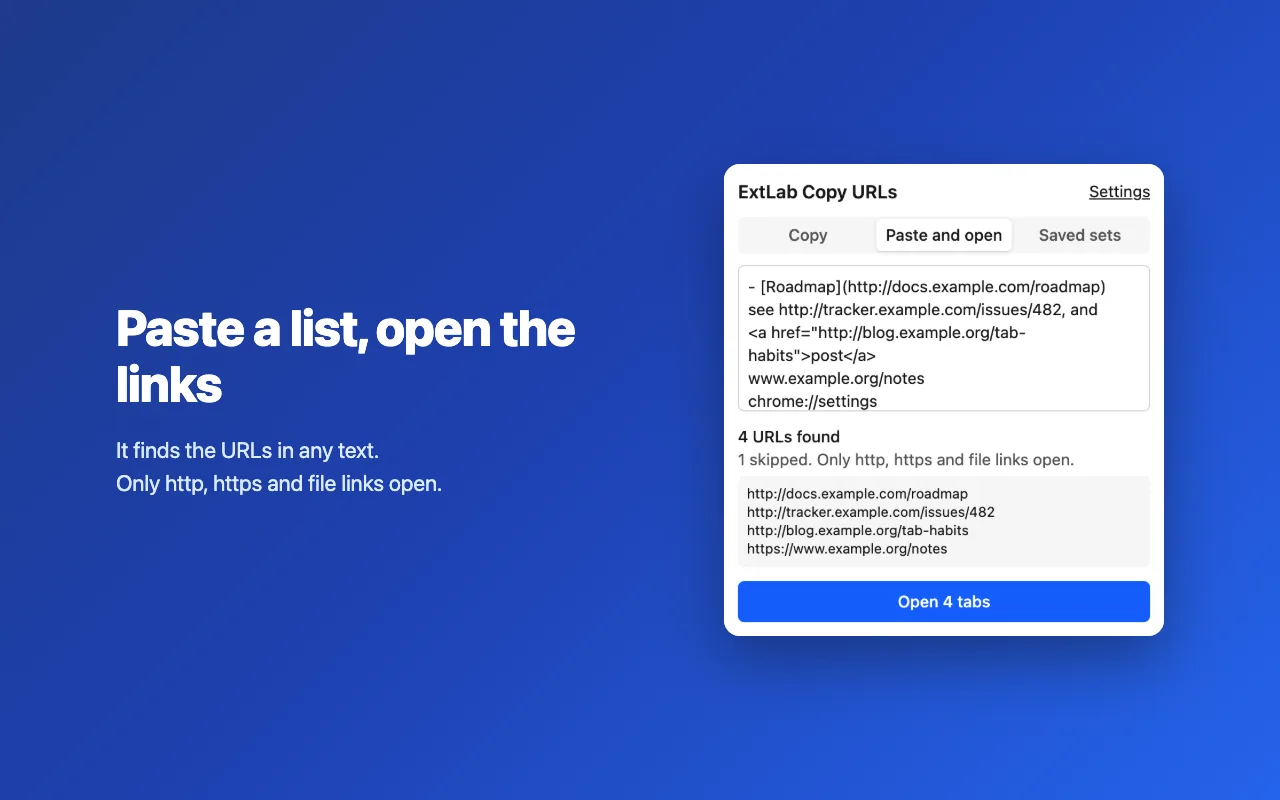
- In the popup, open Paste and open.
- Paste any text with links: a list, Markdown, HTML, CSV or JSON.
- Check the list it found, then click Open.
It adds https:// to www. links and to a line that holds only a domain. Duplicates go. Only http, https and file links open, and the popup counts the rest as skipped. Above 20 tabs, it asks first. The tabs open in the background, and closing the popup does not stop them.
All windows (Pro)
Under Tabs to copy, choose All windows. Turn on Group by window for a heading above each window. Numbers run through the whole list.
Filter and select (Pro)
- Filter by domain keeps one site.
- Filter by text keeps tabs that match your text.
- Only selected tabs copies the tabs you selected in the tab strip. Select them with
CtrlorShiftfirst, then open the popup.
Templates (Pro)
A template is the text for one tab. In the settings, under Templates, click Add template, then write the Text for each tab.
| Token | Becomes |
|---|---|
{title} | The page title |
{url} | The URL |
{domain} | The domain, without www. |
{index} | The number in the list, from 1 |
An unknown token stays as it is.
Saved sets (Pro)
On the Copy page, choose Save as set and give it a name. Under Saved sets, click Opento bring the tabs back in the current window. A set does not keep window structure. A tab such as chrome:// stays in the set but does not open.
Activate Pro
- Buy Pro on Gumroad, or start the 7-day trial from the extension. Gumroad emails your license key.
- In the settings, paste the key under License and activate it.
One key covers 3 browsers. When Pro ends, the list goes back to the current window, and a template format falls back to URLs. Saved sets stay listed and can be deleted, but opening one needs Pro. Your choices come back with Pro.
Troubleshooting
- A file link does not open.
- Open
chrome://extensions, then the details of ExtLab Copy URLs, and turn on Allow access to file URLs. - The shortcut does nothing.
- Another extension may use the same keys. Set new ones at
chrome://extensions/shortcuts. If the popup cannot open, the toolbar badge shows!. - It could not write to the clipboard.
- Click Copy to try again.
- The list is shorter than my tabs.
- Check Skip pinned tabs and Remove duplicates. Free copies this window only.
- A list opened tabs I did not expect.
- A line that holds only a domain counts as a link. Check the list before you click Open.
Your tabs, URLs, templates and saved sets stay in your browser. The privacy policy lists what is sent. Still stuck? Write to support@extlab.app.